Opera Mini 3.0 – review

I did not even have the time to test Opera Mini 3.0 Beta that the full release is ready.
I have felt bad for complaining about the HTTP headers and not even give a shot to the full features. So here comes a little review.

Installation was smooth. I downloaded the MIDlet and installed. During the installation the client checked my internet connection and automatically picked the best one. It also generated keys for security.

Test #1: HTTP headers
I visited my test site at http://t.wurfl.com/ to grab some headers. I STRONGLY suggest the download from WAP, because as Mike Rowehl pointed out, the default browser’s user-agent will be store in an HTTP header.
These are the custom headers:

  • X-OperaMini-Features: advanced, download, camera, folding, inputhints
  • X-OperaMini-Phone-UA: SonyEricssonW810i/R4EA Browser/NetFront/3.3 Profile/MIDP-2.0 Configuration/CLDC-1.1
  • X-OperaMini-Phone: SonyEricsson # W810i

Test #2: Photo Blog
I wanted to upload a test image. Entered the Photo Blog link from the main page, took a picture of a nice flower… And discovered that the only supported blog is Opera’s! What a bad surprise. Reading from Opera Mini’s site: Now you can take images with your phone camera and upload them to any of your blogs, forums or e-mail blog right from Opera Mini.
Looking at the screenshots it’s clear they are uploading to Opera’s blogsite, but I thought that was just an example. I could not find any preference in the settings menu.
Reading on Opera Watch, they say you can post to myspace or other blogs. I am sorry I really could not find how to do it!

Test #3: my blog
The page looks very good. On top there’s a link to subscribe to the feed (read more to know about feeds support). All my articles are well readable and the ability to scroll up and down quickly with left and right joystick makes it very usable. Scrolling is smooth.
Images are rescaled and respect the proportions from the original layout. Just like on my desktop I can click on an image and zoom. Initially it fits the screen (little bit of vertical scrolling on big images, but that’s OK) and then I can zoom more to see the real image. I can also download the image.
All the right column of the blog is moved on the bottom of the articles. So I first need to scroll all the articles and then reach the right column. Not perfect, but probably the only possible solution on a small screen. Going through the “label cloud” and previous posts list is OK considering the high number of links. Again the ability to scroll up and down of one page is very helpful.

Test #3 bis: Tom Hume’s blog
Tom Hume‘s blog has a left column with links and images and then the articles on the right column. I wanted to see how Opera Mini would handle it.
The approach is very smart as I see Tom’s picture, a couple of other links and then all the articles. Links to Flikr and previous posts have been skipped totally. I don’t know if this is a feature or a bug, but works very well. I think it’s a feature! 😀

Test #4: slashdot
Slashdot works smoothly. I would add “as expected”. It provides a CSS for handhelds and the content is reduced to the minimum. There’s a form to login and then the articles.
I personally don’t like the layout, you can’t really understand that the title are not part of the article as they are rendered as normal links. A bit of background color would have made it much better on Opera Mini, but I guess the CSS is made to work on any mobile browser.
Reading an article means also loading all the comments. It gets very long. I think slashdot should have made it more efficient for a mobile device. Again, not Opera’s fault!

Test #5: searching with Google
Smooth and effective. Works like a charm.
I followed some random links and all worked nicely.

Test #6: Gmail
I went on http://www.gmail.com and logged in pretending to be a desktop computer. A big alert was on top of each page reminding me that standard HTML was being used. A link to move to the advanced AJAX version was available. Clicking would simply reload the same page.
The entire site was barely usable. Each page started with the left column of gmail, so mailboxes and labels. No contacts. Then the e-mails. It was crowded and mostly hard to read. I guess the mixture of the standard HTML interface and the small screen caused this. To read emails I had to scroll down about 3 pages.

Test #6 bis: Gmail mobile
When logging on the standard gmail I tagged the “remember me on this computer”. When accessing http://m.gmail.com I was logged in automatically.
The layout was much cleaner and simpler, of course. Navigating around was pretty easy and fast, of course.
Should be noted that I could not make the accesskeys work. Is this something that I need to discover in the online documentation?
Lists of links were all folded. Clicking on the + sign would open the list and I could pick the desired link. Quite nice feature. I am not convinced this is a usability advantage, but was nice to see it. Interesting. I will need more time using it to give a final judgment on this.

Text #7: RSS feeds
I tested my blog’s feed, of course. Clicking on the feed (always presented as the first link on top of the page) loads a page where you can see a first link that says “subscribe” and below the contents of the feed.
Subscribing brings you to the Feeds page. Feeds can be sorted alphabetically or by time.
In the Feeds page you see your subscriptions with a tiny icon, a title, and the number of unread news. Once you visit a feed all news are marked as read.

Overall results
The general user-experience is very good. I browsed a lot of sites and I could access all the information I needed very easily.
It is clear that some sites are more friendly and some others are harder to render.
No objects such as flash were rendered by the browser, but that’s OK too.
Browsing is fast and smooth and I really, really like the ability to scroll up and down quickly. Ebay is really ugly, but works. PlayDeep, an e-commerce site, works and I could place an order. Too bad that all the simple javascript in the page did not work at all. Every time a javascript event was supposed to happen I saw a big error message and the phone vibrated.
Sites that are providing a good CSS for handhelds clearly work better than other sites so thumbs up for the authors that took the time to draw a good stylesheet for small devices.
Memory does not seem to be an issue as it used to happen with old WAP browsers and sometimes still happens with some modern browsers.
Pop-up windows are managed OK. It is probably not clear to the user the difference between a normal link and a pop-up, but I also don’t see much advantage in notifying it as the browser only shows one page at a time.
I did not like that when picking something from a list (select element), the list is shown as a new page and when I pick the element the browser goes back to the web page. I would have liked the standard dropdown list like in all browsers. This is a feature that has also been present in the Openwave browsers for years. According to openwave this is a usability feature that helps the user pick the desired element more easily. I personally don’t like it and always feel strange when I click on a list and see an effect similar to opening a new page.

As an end-user I like the ability to automatically detect the best connection, but as a geek I would have liked to have a menu in the settings to change it and not a button to re-test. I want to be in control. 🙂
When loading pages a tag “Processing” appears at the bottom and then changes into “Loading” and shows the KB that are being downloaded. I know that “Processing” means that the Opera Mini-Proxy is downloading, analyzing and adapting the page, but it’s odd to see it on the client. It feels like the client is processing the page before having downloaded it. Just a small comment, this does NOT mean that the client is bad! Not at all!

Last thing is I would like to know what the “features” in the HTTP header are. I can guess that “camera” means I can take picutes and that download means I can download images. Is DRM supported? “inputhints” means that my phone supports T9 or does it mean that sites can use the format attribute? “advanced” means what?

How I did it
Tested with a Sony Ericsson W810i, running Opera Mini 3.0.
Mobile Operator is TIM, in Italy and using EDGE connectivity.
I will check my next bill to see how much this test costed me. Unfortunately the online service provided by TIM does not provide the detailed traffic.

Download from web: http://www.operamini.com/
Strongly suggested wireless download: http://mini.opera.com/

Want to see how it will look on your mobile? Look at the Opera Mini simulator.

Other Reviews:
Dan Appelquist: New Opera Mini Integrates Photo Blogging
Dominique Hazaël-Massieux: Off-line browsing on a mobile device
Helicoid’s mmm: Opera Mini 3
Mike Rowehl: Bloglines Mobile and Opera Mini 3
Articial intelligence in mobile games

via BusinessWire: “Artificial Life, Inc. today announced a co-operation with TeliaSonera to release the latest mobile games such as V-boy™ and V-Penguins™ and their accompanying side products like wallpapers, screensavers, ring-tones and video mails. The products will be available on TeliaSonera’s mobile Internet portal SurfPort, which is launched in Denmark, Estonia, Finland, Lithuania, Norway, and Sweden.”

Recent mobile-related news

Here’s a list in random order of mobile-related news that I found here and there.

More rumors say that BenQ Mobile should have found a way to secure its future and that the CEO will most likely step down.

Also, STMicroelectronics should enter the mobile business with its ARM11 product range and the recently licensed Cortex-A8 process that should improve the performances drastically.

J2ME device features recognition

Manufacturers of mobile devices and operators are not always good at providing device descriptions. When they are kind enough to provide them, they often provide them the way they like it. Sometimes it’s a webpage, sometimes is a PDF, sometimes a spreadsheet. Nothing bad, but they are all in a different format and most likely provide different info using different metrics and level of detail.

For these reasons, a number of J2ME applications have appeared to try to track device capabilities and try to put them all in the same grid in the same format.
Going back to my memory, I think the first of this kind that I saw was JBenchmark. It’s been around for a long time and certainly lists A LOT of devices, probably the site and resource with the highest number of J2ME devices. It’s amazing how many devices were tested and how many features. It checks for MIDP 1.0, MIDP 2.0, 3D, audio features and more. Device features are sometimes in integer numbers (such as screensize), boolean (library support) and “stars”. Yes, stars, which means that the feature in question has a vote about it’s performance. Votes range from 0 to 5. This is very good if you want to know which device is better.
The bad part is that you don’t know the real results of the tests. Since they are shown as stars, you will not know the real results.
The software is not open-source, as far as I know, and this means that nobody except for the JBenchmark team, knows for real what it’s measuring and how.
Data is provided by users. Kind people that downloads the MIDlet, runs it and uploads the data to the server (automatic). All results and balanced and the final result is an average of all the results received from users. Quite a good idea, I think.

Next comes to my mind TastePhone. It’s an open-source MIDlet developed by a very good French student. He developed it for a school project, but then kept it going on his own. Really nice MIDlet. The concept is the same as the one from JBenchmark, you download it, run it and upload the results on the main server. The pros are that the MIDlet is open-source and all the results are available from a web page. The cons are that the development stopped a couple of years ago and while the server is still up and running and receiving updates of data from time to time, the development of the software hasn’t had any progress. This was a very good start, would have been good to see it progressing, even as part of other projects.

J2ME Polish has been running for years now. In two words, it’s an open-source framework to develop J2ME MIDlets running on a lot of devices (hopefully ALL). Part of the project is, obviously, to collect device descriptions to be able to optimize MIDlet builds to single devices or device clusters.
Originally developed by Grimo Software, J2ME Polish included SysInfo into its standard release.
Just like TastePhone and JBenchmark, SysInfo is a tiny MIDlet that you download and run on your device and it tests for capabilities. You later see a report and can provide the data to J2ME Polish (or keep it secret if you are so selfish!).
The MIDlet hasn’t seen much development in a long time now and does not provide the ability to upload the results to a central server.
As far as I know, a lot of work is supposed to happen, but I have seen no updates in more than 1 year now. Too bad! (browse CVS here)

So the reason why I originally thought about writing this article is because I found a new kid on the block. All the above softwares have been around for quite some time. A few days ago (I would say a couple of weeks) I stumbled on this site called Mobile Zoo. The site provides a MIDlet that you can download on your device, run it and it uploads the results to the central server.
I downloaded both the MIDP 1.0 and MIDP 2.0 version on an old Nokia 3120. MIDP 2.0 did not even start (as expected), MIDP 1.0 ran for a few seconds (5-10 I’d say) and then started trying to upload the results to the server. Unfortunately the upload never worked. I checked the configuration and it is supposed to be correct. Too bad it did not work.
Apparently, according to the site statistics, they have a lot of contributions and recorded a lot of “device DNA’s”, as they call them.
As per JBenchmark, the MIDlet is not open-source, but the data that is collected is pretty standard, and don’t need much comparison as with the “star-system” of JBenchmark.
I am not a J2ME developer, but I have to admit that I had never seen this site and I had never heard of DSEI, the company behind it.
They apparently provide API’s to developers. If you have any experience with it and would like to share it, you’re welcome.

Volantis and Cingular

I just received the devCentral newsletter (sorry, no web version that I could find) from Cingular.

I read the annoucement of an agreement between the two companies that will allow authors to develop their sites using XDIME and Cingular will provide the gateway from Volantis to adapt the content to any mobile device. This is BIG news!

I am really looking forward to test the new WAP advantage (free subscription is required to read the news) solution by Cingular.

Opera Mini 3.0 Beta 2 is out

I meant to post this yesterday, but then Blogger had some problems and did not log me in. Now everything is ok, so here’s the post.

I read that Opera Mini 3.0 Beta 2 was out. I was just in the process of downloading and testing. I clicked on the ChangeLog page to discover the new features and fixes.

To my suprised I discovered that eventually Opera decided to re-introduce a parameter to recognize the device it’s running on. This was a hot topic on wmlprogramming as more than one developers and service providers did not know how to deliver contents to their users (don’t think only about ringtones, also consider images rescaled to best fit the screen, for example).
Users download and install Opera Mini because they want a better experience on WAP (and Mobile Web), developers work hard on their mobile sites to provide an optimized experience, but with the old Opera Mini this was not possible. This was certainly an issue.
From the service providers’ point of view it was a problem because they could not recognize the device as all were identified with the very same user-agent.
From the browser’s point of view it was a problem as Opera Mini should be able to manage the download, store it and manage the DRM if implemented. Not an easy issue.

I exchanged a few e-mails with my friends at Opera and they understood the problem. Talking is always good.

So Opera Mini 3.0 Beta 2 comes with a solution. Reading from the changelog:
# Added three new request headers, X-OperaMini-Phone, X-OperaMini-Phone-UA and X-OperaMini-Features

But wait… Let me think… Haven’t I seen this before? Something similar… Oh, YES! MS IEMobile! Now I remember! If you don’t, check out this other article I wrote before, new MS IEMobile user-agents.

I know Opera is for the open standards and is one of the most active companies in the W3C, but… this does not solve the problem for developers! Trying to read Opera’s mind in 3 points:

  • Opera is for open standards
  • Opera wants to be nice to developers
  • Opera wants sites to provide the same page to their browser as if it was a web browser and then the client will adapt

For these reasons they kept the user-agent unique for all devices, but added extra HTTP headers (respecting the standard, of course!). Nevertheless, this requires additional work from site developers aimed only at Opera Mini.

What are developers supposed to do? Install Opera Mini on EVERY device and check how the HTTP headers change to discover which device it is?

There MUST be a better solution.
A unified solution among all browser developers should be taken. I would suggest a solution around WURFL, of course, but if this is not possible, well, then even UAProf would be better.

processor produces electricity

via AppleInsider (but not exactly an Apple-centric news): “Eneco chief executive Lew Brown delivered a sales pitch to potential investors about a new ‘solid state energy conversion/generation chip’ under development that will convert heat directly into electricity, according to the Green Business News.

According to the article, companies like Apple and Dell are interested, but are still wondering what to do with it.

Anyway it’s an interesting research.

YoSpace’s SPEDE 6.0

This is certainly not a new release, but today I needed for a few tests and so I also took a chance to write a short review. I have to admit that in the last few months I haven’t been involved in any tough WAP development, but more in writing guidelines and reviewing documents. Nevertheless I think this is going to be a very useful tool, so let’s see what it offers.

First things first. Yospace offers two tools, one is an online emulator for your site and one is a develompent tool, AKA SPEDE.
Where do you get it? A trial version of SPEDE 6.0 is available for Windows, Linux and Mac. Is this the proof of Java’s write once run everywhere?

What is it?
SPEDE is a testing toolkit that offers all the needed tools to verify that your mobile sites work as expected on many devices with little effort. It is primarily an emulator, but also offers more tools that will help developers to clean-up mistakes and optimize pages.

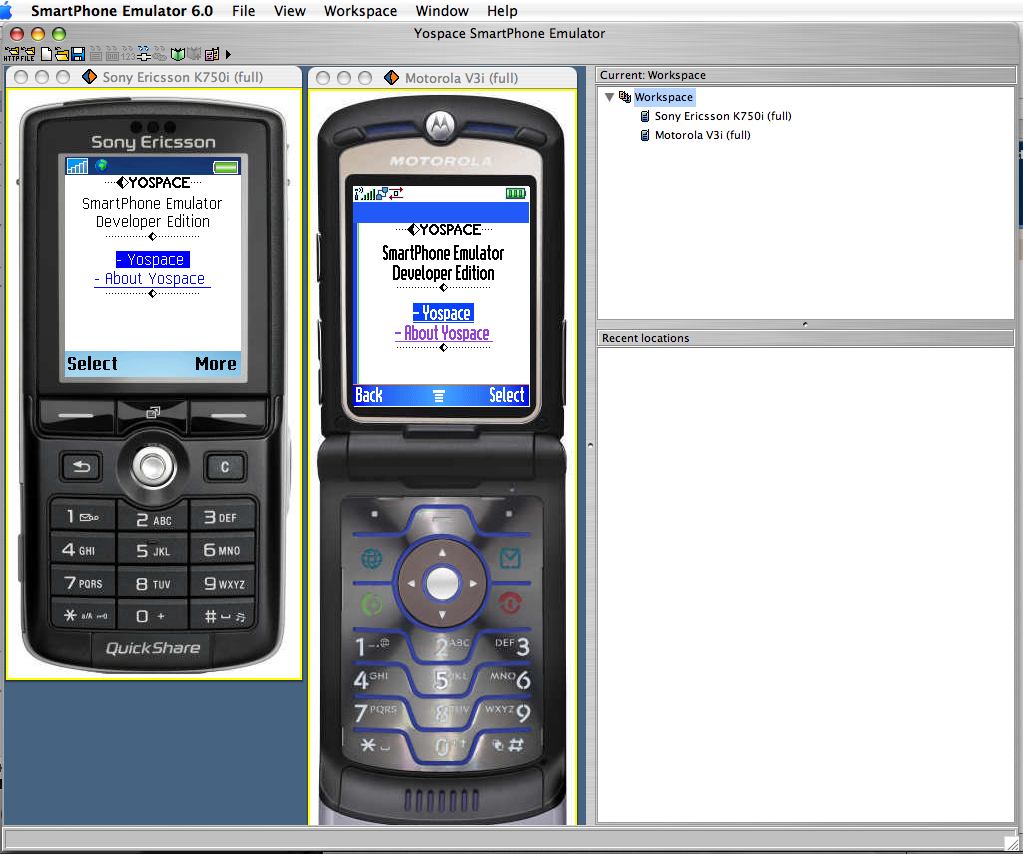
When you open it for the first time you get two devices side-by-side a Sony Ericsson K750i and a Motorola V3i. The devices will display a default start page from Yospace’s site.
On the right you will have a box that represents your workspace (the devices that you want to emulate) and another box for the recently visited locations. Very handy to jump back and forth.

Now the real fun starts. On the right you have a “workspace” box. Right-click and add all the devices that you like. I like to have different brands and families. I’ll add a couple of devices to show you how it works.

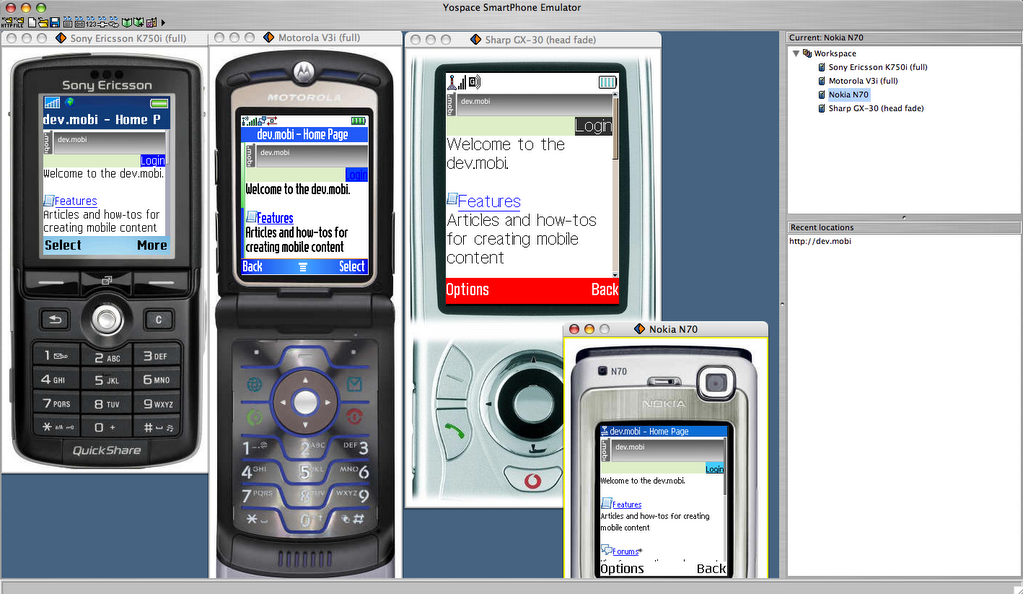
With 4 devices side-by-side it’s very easy to see how a page is rendered. You can load and re-load pages on a single device or on the entire workspace alltogether.

How are devices emulated? Yospace buys the real devices, checks the resolution, characters per line, number of lines, screen size in inches (they are from Middlesex in UK!) and everything that is needed to show how the devices look. They also test device features such as available fonts, font sizes, image formats, how images are rendered and so on. They do a deep device testing to make the emulation as real as possible.
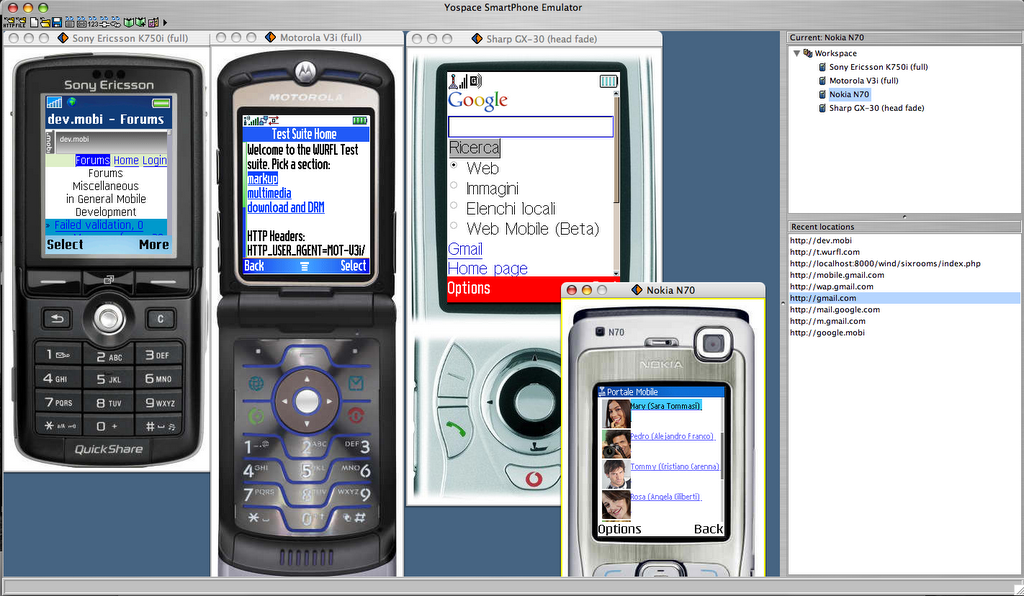
Each device will act as the real device and you will be able to browse to any page. Here’s another screenshot with a different page on each emulated device. I could open single URL’s on each of them and then keep browsing. You can click on the buttons to see how it will be on the real device or use your keyboard (much easier!):

What else? Some of the tools available clearly come from the WML days, but they are very useful if you still want to support them and make sure you never get a “Unsupported content” or similar error.
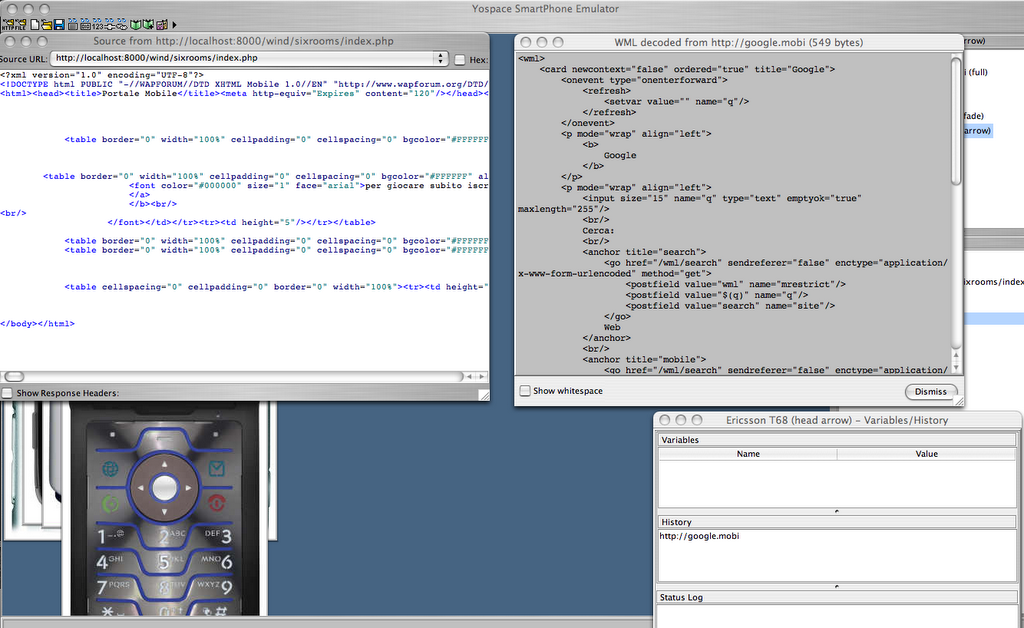
Check out the full source, the decoded markup (if you received a WMLC page, otherwise it will be the same) and WML variables. Cookies are also available, but not in this screenshot. You can see, edit, add and remove them at your will. Feel the power!
Click on the screenshot to see it in fullscreen. You will notice that you can also see the HTTP headers, very useful if you want to check the charset, content-type and other headers. Hex view is also available, just in case you want to edit the binary version! 😉
Source URL is a dropdown and you can pick previous pages still in cache (each device has its own cache!).

Like every good browser, SPEDE also give you the possibility to add and manage your bookmarks.


Something that is not present in your default browser, but that will be very useful if you’re a mobile developer is a “device settings” menu that you can personalize for each device.
Configure the user-agent string, decide the parsing strictness and add custom headers.

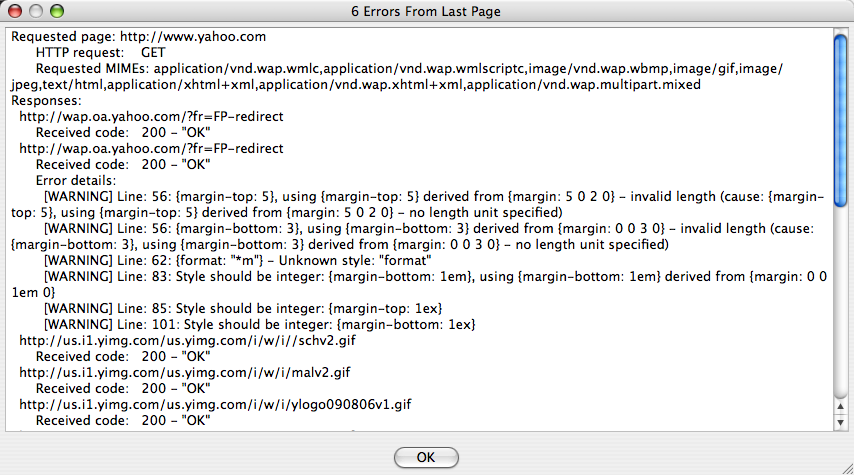
If you can choose between strict and relaxed validations… You will also want to know if your page effectively validates. SPEDE offers you this too, of course. See this last screenshot that shows errors (if any) and a list of the requests made to download the markup, CSS, images, etc. Very useful!

A “skin manager” will let you see all the available skins. As described previously, skins are not just images drawn around the page, but real implementation of the browser behaviour.

The last feature is also very important if you want to test your site from time to time to verify that everything is still working. The scripting engine. You will get two windows, one with an old Nokia 7110 and a text window. You can write your script, save it, re-open it and edit it. Once you’re happy with it, you can run it.
I have to admit I did not test it, but I understand how important it can be if you keep up a big site for a long time and always want to make sure it’s working properly.

Is this a perfect tool? Well, it’s a very good tool and if you’re serious about mobile development, I suggest it. Like every other software, it’s not perfect. While testing and taking screenshots, a couple of times the Sharp GX30 hung and did not want to open any other page. I forced the workspace to load another page and eventually worked. I don’t konw what happened.
The Motorola V3 and V3i did not load the images for a WAP page that I have developed and incidentally I have a V3 here and works like a charm. I know that YoSpace dedicated a lot of time to this tool and I believe that the rendering if faithful, but of course this little glitch raised some doubts or at least made wonder how precise can be the emulation of a third party tool. Will it be able to emulator all the different sides, behaviours and glitches? I think it’s a very tough job.
When you look at the source code, YoSpace kindly included syntax highlighting. My personal preference would have been for more intense colors such as red. Also, the “Status page” shows errors, if any, it would be great to also see it in the source code window, highlight the markup.

It would have been good to have more Siemens and LG devices.
When are new skins available for download?

One last thing is the general UI. I tested on a Mac OS X. The UI is clearly inspired by Windows. I know that it’s a big effort for a small number of users, but a more native interface would have been appreciated.

Nevertheless, this is a great tool and don’t forget that it’s DAMN cheap!

3 introduces X-Series

I just received an e-mail to view the webcast about the new X-Series from 3.

Just 2 minutes later I read from Tom Hume that 3 might be going out of business in UK.

I don’t know if 3 will really be sold and if Vodafone will buy it, but I can tell you I’m really looking forward to see X-Series. In two words, it’s a flat free subscription to access internet services.
According to the site you will have your standard subscription, whatever you picked and you will add X-Series on top of it. You will be able to call with Skype, chat with Gtalk, Y!M and MSN, watch TV with Sling and browse the internet.
This is all VERY interesting. I wonder what the flat free is and if the internet will REALLY be open.
There are only 2 supported devices. 2 high-end devices from Nokia and SonyEricsson. Why is the device required? I am a bit scared that this is another big marketing announcement and then, when you read the details written in the back of the contract you discover that it’s a flat fee to chat over MSN and not for the whole internet.
I also wonder about Sling. How is it going to work in the other countries? What are Mr. Murdoch and SKY going to say about this?

Anyway, if I’m wrong and it’s open internet…. Count me in!

The service will be launched in UK next month and in the other countries in EU where 3 is present early next year.

On a similar trend, Vodafone Italia has launched “Vodafone Infinity Fastweb” (news item in Italian here) that lets you close your fixed line subscription, receive calls to your old number on your mobile, pay a lower rate when at home (even if you effectively receive the call on your mobile) and use a real aDSL connection for internet (and Skype, why not?).

TIM and Wind in Italy both have mobile and fixed lines, what are they doing?