Gtalk in Gmail

It sounds very strange to me, I must have lost it, but it seems like nobody has written about Gtalk in Gmail, yet.

A few weeks ago I was in a VERY restricted LAN and could only use services on ports 80 and 443.
I went on my gmail account to check for emails using Firefox 1.5 and noticed the “Quick Contacts” frame. I expanded it and noticed that some of my contacts where actually online.

I tried to chat with 2 or 3 friends. Here’s how it looks:
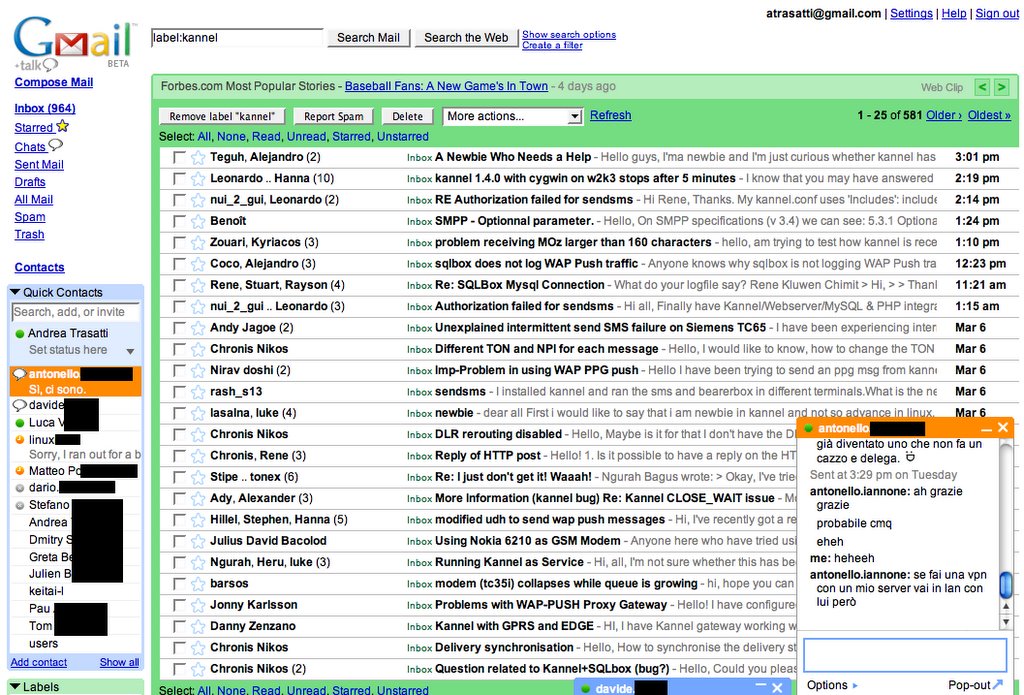
Things to note.
In the “Quick contacts” you can see users’ status, away messages and so on.
When you start a new chat, windows are stacked horizontally, from right to left. I actually haven’t tried to open enough chats to see what happens when the row is filled.
Windows can be opened, minimized or open as a pop-up with the Pop-out feature.
Window titles are highlighted when you have a new message.
The chat is really fast, feels a lot like IRC and not like a slow, clunky web chat with reloads and so on.
Smiles have a nice animation, you see the tag such as “:)” and then it animated and mutated into the smile (as you can see it in the screenshot).

Considering that it’s a web interface, the usability is very high and chatting is pleasant. Refreshes are smooth and you don’t really notice it.

The only thing is that you need to keep the gmail window open. Even if you “pop it out”, if you close the main window, even the other windows will be closed. Luckily you get notified and if you try to close the gmail window you will at least know it.
When you close the gmail window you become offline automatically.

My life tagging files

Metadata seems to be the next big thing for filesystems. Apple released OS X v10.4 with the “cool” Spotlight that lets you search your hard drive for files and contents. Windows Vista will feature something similar.
The cool thing of SpotLight is certainly the possibility of search for words within the documents (or emails) and it is damn fast if you consider that it is searching your entire hard drive.
Google Desktop is another.

Recently I installed a plug-in for Mail.app called MailTags that many think is awesome.
I installed it because I wanted to check how cool it is (I have read more than once and on different sites how cool it is).
I have to say that it has some really neat features that let you add comments to emails, keywords and associate email to specific projects. A new feature that I have to say is really cool is the ability to integrate with iCal (the native OS X calendar). When you receive an email you can assign a due date and it will add it to iCal automatically. This is just great, I have to say.
I tried to tag a few emails, I tried to add metadata to a few files here and there… What I don’t understand is the final use of all this metadata. If I have to spend let’s say 5 minutes for each email or file that I receive to tag it with the project, a task or a few comments, then why not simply archive it in the appropriate directory or folder?
I don’t see this GREAT advantage from tagging files and e-mails. Looks a lot like archiving.

I am wondering what is people doing with their tags and how they use them.

WURFL Patch debugging

The ability of applying your own patches, modifications and updates to WURFL is really important. If you are here reading the post then you probably have already visited the WURFL site and read about the patch file. If you haven’t this is a good time!

As the WURFL evolves and as we add new devices, it is obvious that you might find some conflicts applying your patch file OR it might happen that you patch file is not applied properly.
Something that happened to me just a few days ago (and I actually hit my head on the wall for a while before understanding why) was that we slightly changed the fall_back tree for the SonyEricsson S700 “family”. First of all, why do I say family? That’s because many recent SonyEricsson devices are all the same and change their name slightly depending on the area. For example the S700i is the same as the S700a, the former is sold in Europe, the latter in North America and they are the same as the S700c which is sold in China.
For this reason we have created a “virtual device” so not an actual_device called S700 and then configured the S700i, S700a and S700c to fall_back on it. The fall_back was changed from sonyericsson_401_generic to sonyericsson_s700_ver1 and all capabilities such as screen size and image formats were moved for the S700i to the “generic S700”.

Unfortunately in my patch file I was add some information about the S700i and I was automatically changing the fall_back from to the old one. This way I basically still got my “new capability” but LOST all the device capabilities such as the screen size!
This was really disappointing!

How to verify your patch file?
I just committed to CVS an update to the PHP library. In the wurfl_config.php there’s a new constant called “WURFL_PATCH_DEBUG“, it’s a boolean. By default it’s set to false, but if you need to check your patch file you should change it to true.
When set to true, when applying the patch, the library will generate A TON of logs, but really useful to track changes and updates.
This is an example of what you get:

Fri, 3 Mar 2006 14:46:04 +0100 [Enlighted 1599][parse] Updating device nokia_3220_ver1
Fri, 3 Mar 2006 14:46:04 +0100 [Enlighted 1599][parse] nokia_3220_ver1: setting themes_nokia_s40=1

As you can see, now I can check which devices were updated. I also see if a device was added and of course what was added or updated. In this case I configured that the device supports Themes for the Nokia Series 40.

Now let’s see what it says about the S700:

Fri, 3 Mar 2006 14:46:05 +0100 [Enlighted 1599][parse] Updating device sonyericsson_s700i_ver1 : fall_back, sonyericsson_s700_ver1=>sonyericsson_401_generic,

As you can see it says that the device was changed and that the fall_back has been updated. In most cases you will be happy about this change and you probably made a patch JUST for this. In cases like mine you will not be as happy.

The PHP library also logs any error in the patch file. When turning the debug on you will also get some extra information that should help you understand why the update failed.

Happy patching, then!

W3C TP 2006

I am currently in the beautiful Mandelieu-La Napoule (I hope I spelled it right) attending the annual meeting of the W3C, a.k.a. Tech Plenary 2006.

It is really great, there is this HUGE concentration of geeks all talking about really technical stuff. Everyone is going into their room and talk for a couple of hours, then they all get out of their rooms like when we went to school and head for the buffet, have a coffee and a croissant (of course) and then back to their “classes”. The funny thing is that during the breaks you get to hear this people talking about SVG, Web services, xHTML and everything related to the web and internet and the W3C.
Also, you get to meet SO many people. I was really happy to meet in person Antoine Quint who works in the SVG group and of course José from Telefonica I+D.

Everyone is really nice and happy to chat. You really get a chance to go to anyone in any group.

This is a great event.

I am really happy i had a chance to attend.

PS: I’m disappointed there are all these guys wearing Opera t-shirts and I did not get one!

MacWidgets

This is my first post on the Blog from this neat new Widget for Dashboard!

Using the web interface of blogger.com is nice and has a lot of features (when using Firefox and NOT Safari) but for some reasons after a while takes a lot of RAM and CPU.
Hopefully this new widget will make it faster and easier to post.

Google is also offering other Widgets. Check them out.

UPDATE: Don’t use copy and paste or you’ll also get the HTML syntax for font and size of the copied text. Just a trouble in this case as I used it to paste the URL of the widgets and so it messed the HTML tag.

640K Should be enough for everybody

I think one bank of the RAM of my PowerBook is gone. I had SEVERAL kernel panics in a few days. I ran full memory tests and miserably failed.
I removed a yucky Hynix RAM and left my beautiful-high-performance Corsair RAM and now is working nicely (3 days now).

The sad part of the story is that I am temporarily stuck with only 512MB and my Mac is DAMN SLOW! Could it be Firefox and Thunderbird that together suck up at least 70MB? Then add Mail.app, Safari, X11 terminals, iTunes, NeoOffice, AdiumX, Skype… Anything else?

I was not used to this LOW RAM! 🙂

Wiki Editing UI

Today I had to fill in some documentation in our internal servers.
We use mediaWiki.

I had a real hard time filling less than 2 pages of doc.
mediaWiki is really good if you have to do really basic articles, but seems a little bit too complicated and sometimes missing basic features (at least IMHO). Also, the editing UI is SO UN-userfriendly!

Why can’t they integrate with FCDEditor?

Do we really still need to use ” for italic, ”’ for bold and so on?
Why can’t I decide to have a carriage return that is not a new paragraph?

Am I ignorant about Wiki’s? That’s possible. 😀
Sometimes it looks like things are uselessly HARD to do. Why can’t I have buttons to edit in Wiki? Am I the only one who would like to have them?

WURFL update in CVS

I committed to CVS the latest update of WURFL. It’s a big update, it includes many devices that I added myself, many UAProfs imported, contribution from Alejandro Guerrieri about South American devices and contribution from Pau to fix devices without actual_device_root or without brand and model.

We also changed a few user agents removing for example /1.0 in the “default user agent” to make it easier to match firmware revisions against the user agents that we have in WURFL.
This change might break your patches, if you use any.

Please, download and try it and let me know of any problem.
According to the CVS, changes are something like 4567 new lines and 978 removed lines, that is to say, about 1000 lines updated and 3500 added!
actual_device_root are 1293 now!!!

As soon as we are done with possible errors in this update I would like to release 2.0.2 and then we can continue to add new devices.

Let me know about problems that you encounter.