Working at late night

Lately I haven’t posted anything interesting. I have been busy with work and real life.

Following the W3C WG’s takes time. You need not only to follow the mailing list and take part to teleconferences (I regularly forget and need someone to ping me!!), but you also have to read the proposed documents and try to make wise suggestions on how to make them better.
While this might have seemed something easy, I have realized that it does take time and since I’m not there just to look at others work, it is taking a good amount of my time (at least more than I had expected).

This made me think of about 1 and half years ago. We were working really hard to complete a project that had been started late and had a well defined dead-line.
The last 3-4 days had been crazy, working until late night (3,4 in the morning).
The very last day we worked until 7am, trying to complete all the features.

While it was REEEALLY stressing, it has also been fun. I really enjoyed that project and the people I worked with.

This is an “action shot” taken that night:

This poor girl was the DBA. She didn’t have much to do, except in case we (Developers) had a problem, but for some reason did not want to leave. She remained until 6am, I think. We were working and didn’t notice that she was sleeping… We wanted to finish everything and were really in a hurry. We were not being quite or anything, but she must have been REALLY tired.
I couldn’t stop myself from taking a couple of pictures.
She had a notepad open and was “writing” a ton of “g”.

She woke up a couple of times, raised her head and then slowly dropped it back down on the keyboard.

We had a few minutes of giggles.
Google’s Personalized Home

Even Google has eventually launched a personalized home.
All the most common features are there such as headlines from “Top news”, feeds from sites such as Slashdot or Wired, weather forecast, etc.

While personlizing I noticed that all the requested “sections” were being simply added one after the other, divided into three main columns. I immediately wondered that it wasn’t the order I would have wanted them to be… But Since it was just a mere test to see how it worked I didn’t pay too much attention.

While editing the prefences of the single feeds (you may change the number of headlines to see, for example), I incidentally dragged the top bar of the section a little bit to the right (instead of simply clicking on “edit”). I noticed that the bar was following the mouse pointer… A little lamp instantly turned on over my head. I grabbed the bar and moved the section in another spot and magically the section was moved in another column and in the exact position I wanted it.

That’s magic!

Do you remember HTML 3.2, with all gray background and only <hr> to separate text?

WURFL mid-Spetember update

I originally started this blog to post freshnews about WURFL.
I understand that many people visit our website on sourceforge (http://wurfl.sf.net/), but I think that not as many read the wmlprogramming mailing list.
I thought that writing a blog might keep more people up-to-date.
On the other side there aren’t that many updates. I always work on WURFL, but there are not sensational updates. It’s a hard work and very time consuming, but I understand we don’t have anything sensational to write every single week.
I ended up writing posts about FireFox, my Apple-passion and so on. I wonder how many are really interested in that (and I also always wondered why should people be interested in blogs in general, but it looks like I’m one of the few thinking this). You will now ask yourself why would I write a blog if I think that most people from around the world will not give a damn about it. The answer is simple: testing. See how it works and how it comes out. How much interest is generated.

But now let’s get back to WURFL. If you are not updating directly from CVS regularly you are not very up-to-date about the changes. Thanks to Pau, one of our regular contributors, we are adding a TON of updated max_deck_size’s. This is done thanks to a script he prepared that checks values passed by the Openwave gateway (MAX_PDU_SIZE) that in general refers to the max_deck_size.
On the same topic, someone asked on the mailing list (1-2 days ago) if max_deck_size could be applied to xHTML and i-mode pages too.
For i-mode, as always, the answer is pretty simple: YES. To avoid adding a new capability we decided to recycle the one we already had.
For xHTML(-MP), as always, the answer is not so simple. There are some browsers, from Nokia and other manufacturers that may load pages of different size if it’s xHTML or WML. So the answer is basically “no”. When importing data I always try to keep the smaller (and safer) value.
We are now evaluating if we should add a new capability.
If you are interested and think it’s valuable you might consider promoting it and maybe become a mentor (work to keep it updated).

I also keep working to bring more and more user agents into the XML and parse UAProf’s to add the basic data. UAProf is very useful for us to determine and import basic information such as brand, model, screen size, j2me basic capabilities, MMS and more, but we do need developers’ support to update all the other more detailed (and valuable) info.

Please, keep your emails coming.

Some other things are happening in the underground, but I really can’t talk about them yet and also don’t want to make them public until they are real.

Stay tuned.

Backups are sometimes useful

Since I bought my first notebook I have tried to make regular backups.
Most of the software I develop eventually goes on a CVS/SVN server so I wouldn’t probably really lose anything, but still, saving emails, many PDF’s I stored in the years and so on would be nice.
For this reason, about once a month, I run a backup script and copy the generated tbz2 on an external drive.

A few months ago, for some strange reason, my mac didn’t start properly and when I restarted the Stickies were gone.
After only 3 months, I eventually dedicated the needed 10 minutes to restore the last backup that I remember should be before that date and, *MAGIC*, my Stickies are back!

Now I’m happy I did backups! πŸ˜€

HTTP errors

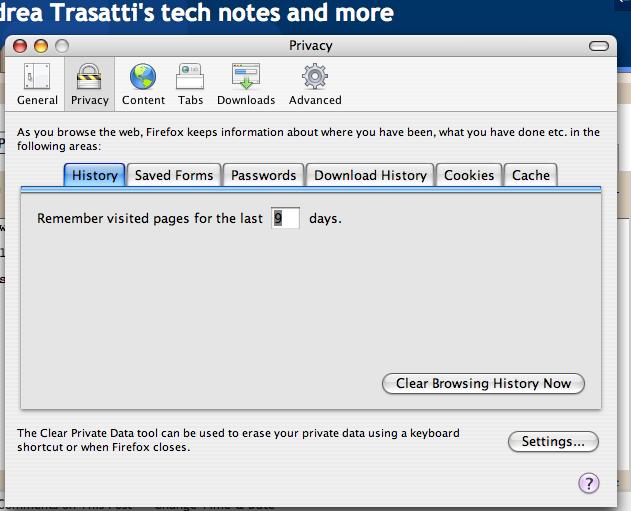
I just downloaded Firefox 1.5 Beta 1 for Mac.

I am really happy with it (tested for about a day now). The most important thing, as a Mac user, is the prefs window. It is eventually more Mac-style and most of all it’s lightyears faster! This was really needed as the old prefs window was really annoying.
Some other widgets have been made more Mac-style. That’s nice too.

Here’s a pic of the prefs window:

I hope no one @Mozilla will feel bad, but from the first tests I’d say that the rendering is the same. Not that this is bad, I am quite happy with the rendering engine of Mozilla, I would not use it, if I weren’t totally happy with it. You actually can’t do much better than this (maybe website designers should start doing a better job…).

Pages for HTTP errors has also been updated. I read some posts on mozillazine of people wondering what could have been changed. Well, the change is that you will now see a nicer page when you try to connect to a non-existing site, for example. Here’s a sample:

I have to say that I was expecting something revolutionary, but it hasn’t happened.
The Mozilla engine hasn’t evolved much as it is already GREAT!
Firefox is really satisfying too, a nice layout for a great engine. What else can we ask for?

With Firefox 1.x I remember that sometimes Google pages such as gmail or blogspot used to take a lot of RAM (and hog a little my little PowerBook) when I left them open in the background. Gmail keeps reloading and from a really high point of view it would seem that Firefox doesn’t cleanup the memory properly. blogspot.com, on the other side, seems to use something in their blog-editor that sometimes HOGS the CPU.
All this happens on my Mac, I have no idea if it happens/happened on wintel or linux.

I will test more and eventually come out with an update.
As far as I have seen until now I’m pretty satisfied. gmail has been in the background for a few hours now and the blog-editor hasn’t presented any hog, yet.
We’ll see.

iPod nano

I have recently purchased the iPod shuffle.
As I had said, I wanted to buy it for a while. I have always thought that buying the original iPod was not a good idea because I didn’t need 60GB and I wanted something small. The Shuffle seemed the good solution.

As I wrote in a previous post, I miss the display while I still think you can live without it.
Now the new iPod nano is out. I think I JUST need it.
I watched part of the presentation, I still need to watch the rest, but it’s definitely beautiful!

Take a look here:
http://www.apple.com/ipodnano/

And the presentation here (you’ll need quicktime, of course!):
http://www.apple.com/quicktime/qtv/specialevent05/

I really wish I could review it, but it’s not possible at this time. I will have to wait for a week or so. I will check if they have it at an apple store near me. πŸ™‚

Word verification

Even if my Blog is not so popular I decided to add the word verification on comments.
I really like to hear comments from my few readers, but I would like to make sure the comments are not about getting a mortgage or buying Viagra.

Sorry for the little hassle, but we need this.
I want everyone to be able to comment, but I also want to avoid this. If you are a real person and not a bot you won’t have much of a problem typing the words read from the image.

shopping mode: ON

Yesterday I went out and spent some money… I have been thinking about these gadgets for a few weeks now and yesterday was the right day.
I bought a new, sleek Mighty Mouse for my Mac. My old bulk-unnamed-notstyllish mouse didn’t fit with the Titanium portable and the Motorola V3. I would like to remind that that’s an OLD PB, bought when 1Ghz was the top. This is important because the new case is NOT as cool as the old one!
Anyway, back to the Mighty Mouse. It’s really cute, of course. Like probably most of the users, in the beginning I didn’t really know how to use the two buttons. I think most of the problem is the fact that you don’t see them. One you get used to it it’s just normal to do it. It takes about 10-20 minutes, not really a long time!
Using the wheel is totally natural. I thought it was a mini-joystick like IBM’s, but it’s really a little wheel that can go in any direction. I mostly use to go up and down, of course anyway being able to move it in any direction seems useful. Maybe some application will be able to use it, I think they should invest some time in this.
Before being able to personalize the buttons and the side-buttons, you need to install the software and restart (I HATE restarting). Once restarted I was also able to personalize the actions. Before installing the software the mouse acts JUST like a multibutton mouse, when you install the software, it becomes a monobutton mouse. You need to personalize it. Since I OFTEN use X11, I configured the wheel to act as the third button when clicked.
The use of the mouse is pretty much the same as any multibutton mouse which is cool to me. That is what people wanted. Plus, it adds the cool Apple-design.
Through the prefs you can configure anything, the behaviour of the buttons the speed of the double click and the speed of movement of the mouse itself and the wheel. Really all you need.
Clicking the middle button is strange, because you click the entire mouse, but it understands it’s the wheel and acts accordingly.

Really neat.

The other purchase was the PSP that has just landed in Europe.
I should probably talk about it for hours, but I won’t do it, I’m sure you already read many reviews on the net (if you mind about it). It’s pretty cool. It’s small, it’s not heavy AT ALL, the display is cool and all the keys are very good. I have purchased Wipeout Pure. Very nice.
I configured the wifi to connect to my home network, but I could not play in multiplayer because I didn’t find anyone (too early?). I can’t wait to try the multiplayer!

That’s it.

RSS feeds a-go-go

RSS feeds have been available for quite a while now.
As an old timer Opera user, I have always believed that setting a number (5-7) of homepages would bring me to the sites I visit most often. Then I would browse from there.

Lately RSS feeds are more and more common so I eventually decided to give it a try. I downloaded NetNewsWire (for Mac, of course!) and this was the beginning of the end. The software (unfortunately) includes a HIGH number of feeds. Of course I subscribed to a bunch of them PLUS all the pages I regularly visit. Now I have about 100 news to read every day and if I don’t read them regularly they GROW UP!
Now I’m addicted.

I have to say it’s pretty cool. Some sites offer the full news through the RSS, some other will give you a short description and then you may read the full news on their site. Both solution are cool to me.

It looks like many people likes this new way of staying informed… And probably I’m one of the last geeks to discover this “new technology”.
Anyway, going back to the wireless business, a couple of people already started to port this “new technology” to the people on the move.
Here are the links:
pixs.jp
www.ifeedyou.com

In my previous post I talked about Marcus. He’s the author of pics.jp.
JΓ©rΓ΄me Chevillat is the author of Ifeedyou and uses wurfl for the multimarkup rendering.

Both services let you read the news title and the short descriptions, the problem arises when you need to read the full article. Maybe while you’re on the move you don’t need to read the entire article. Too lengthy texts might not be so comfortable to read on a normal device like my V3.