J2ME device features recognition

Manufacturers of mobile devices and operators are not always good at providing device descriptions. When they are kind enough to provide them, they often provide them the way they like it. Sometimes it’s a webpage, sometimes is a PDF, sometimes a spreadsheet. Nothing bad, but they are all in a different format and most likely provide different info using different metrics and level of detail.

For these reasons, a number of J2ME applications have appeared to try to track device capabilities and try to put them all in the same grid in the same format.
Going back to my memory, I think the first of this kind that I saw was JBenchmark. It’s been around for a long time and certainly lists A LOT of devices, probably the site and resource with the highest number of J2ME devices. It’s amazing how many devices were tested and how many features. It checks for MIDP 1.0, MIDP 2.0, 3D, audio features and more. Device features are sometimes in integer numbers (such as screensize), boolean (library support) and “stars”. Yes, stars, which means that the feature in question has a vote about it’s performance. Votes range from 0 to 5. This is very good if you want to know which device is better.
The bad part is that you don’t know the real results of the tests. Since they are shown as stars, you will not know the real results.
The software is not open-source, as far as I know, and this means that nobody except for the JBenchmark team, knows for real what it’s measuring and how.
Data is provided by users. Kind people that downloads the MIDlet, runs it and uploads the data to the server (automatic). All results and balanced and the final result is an average of all the results received from users. Quite a good idea, I think.

Next comes to my mind TastePhone. It’s an open-source MIDlet developed by a very good French student. He developed it for a school project, but then kept it going on his own. Really nice MIDlet. The concept is the same as the one from JBenchmark, you download it, run it and upload the results on the main server. The pros are that the MIDlet is open-source and all the results are available from a web page. The cons are that the development stopped a couple of years ago and while the server is still up and running and receiving updates of data from time to time, the development of the software hasn’t had any progress. This was a very good start, would have been good to see it progressing, even as part of other projects.

J2ME Polish has been running for years now. In two words, it’s an open-source framework to develop J2ME MIDlets running on a lot of devices (hopefully ALL). Part of the project is, obviously, to collect device descriptions to be able to optimize MIDlet builds to single devices or device clusters.
Originally developed by Grimo Software, J2ME Polish included SysInfo into its standard release.
Just like TastePhone and JBenchmark, SysInfo is a tiny MIDlet that you download and run on your device and it tests for capabilities. You later see a report and can provide the data to J2ME Polish (or keep it secret if you are so selfish!).
The MIDlet hasn’t seen much development in a long time now and does not provide the ability to upload the results to a central server.
As far as I know, a lot of work is supposed to happen, but I have seen no updates in more than 1 year now. Too bad! (browse CVS here)

So the reason why I originally thought about writing this article is because I found a new kid on the block. All the above softwares have been around for quite some time. A few days ago (I would say a couple of weeks) I stumbled on this site called Mobile Zoo. The site provides a MIDlet that you can download on your device, run it and it uploads the results to the central server.
I downloaded both the MIDP 1.0 and MIDP 2.0 version on an old Nokia 3120. MIDP 2.0 did not even start (as expected), MIDP 1.0 ran for a few seconds (5-10 I’d say) and then started trying to upload the results to the server. Unfortunately the upload never worked. I checked the configuration and it is supposed to be correct. Too bad it did not work.
Apparently, according to the site statistics, they have a lot of contributions and recorded a lot of “device DNA’s”, as they call them.
As per JBenchmark, the MIDlet is not open-source, but the data that is collected is pretty standard, and don’t need much comparison as with the “star-system” of JBenchmark.
I am not a J2ME developer, but I have to admit that I had never seen this site and I had never heard of DSEI, the company behind it.
They apparently provide API’s to developers. If you have any experience with it and would like to share it, you’re welcome.
Volantis and Cingular

I just received the devCentral newsletter (sorry, no web version that I could find) from Cingular.

I read the annoucement of an agreement between the two companies that will allow authors to develop their sites using XDIME and Cingular will provide the gateway from Volantis to adapt the content to any mobile device. This is BIG news!

I am really looking forward to test the new WAP advantage (free subscription is required to read the news) solution by Cingular.

Opera Mini 3.0 Beta 2 is out

I meant to post this yesterday, but then Blogger had some problems and did not log me in. Now everything is ok, so here’s the post.

I read that Opera Mini 3.0 Beta 2 was out. I was just in the process of downloading and testing. I clicked on the ChangeLog page to discover the new features and fixes.

To my suprised I discovered that eventually Opera decided to re-introduce a parameter to recognize the device it’s running on. This was a hot topic on wmlprogramming as more than one developers and service providers did not know how to deliver contents to their users (don’t think only about ringtones, also consider images rescaled to best fit the screen, for example).
Users download and install Opera Mini because they want a better experience on WAP (and Mobile Web), developers work hard on their mobile sites to provide an optimized experience, but with the old Opera Mini this was not possible. This was certainly an issue.
From the service providers’ point of view it was a problem because they could not recognize the device as all were identified with the very same user-agent.
From the browser’s point of view it was a problem as Opera Mini should be able to manage the download, store it and manage the DRM if implemented. Not an easy issue.

I exchanged a few e-mails with my friends at Opera and they understood the problem. Talking is always good.

So Opera Mini 3.0 Beta 2 comes with a solution. Reading from the changelog:
# Added three new request headers, X-OperaMini-Phone, X-OperaMini-Phone-UA and X-OperaMini-Features

But wait… Let me think… Haven’t I seen this before? Something similar… Oh, YES! MS IEMobile! Now I remember! If you don’t, check out this other article I wrote before, new MS IEMobile user-agents.

I know Opera is for the open standards and is one of the most active companies in the W3C, but… this does not solve the problem for developers! Trying to read Opera’s mind in 3 points:

  • Opera is for open standards
  • Opera wants to be nice to developers
  • Opera wants sites to provide the same page to their browser as if it was a web browser and then the client will adapt

For these reasons they kept the user-agent unique for all devices, but added extra HTTP headers (respecting the standard, of course!). Nevertheless, this requires additional work from site developers aimed only at Opera Mini.

What are developers supposed to do? Install Opera Mini on EVERY device and check how the HTTP headers change to discover which device it is?

There MUST be a better solution.
A unified solution among all browser developers should be taken. I would suggest a solution around WURFL, of course, but if this is not possible, well, then even UAProf would be better.

processor produces electricity

via AppleInsider (but not exactly an Apple-centric news): “Eneco chief executive Lew Brown delivered a sales pitch to potential investors about a new ‘solid state energy conversion/generation chip’ under development that will convert heat directly into electricity, according to the Green Business News.

According to the article, companies like Apple and Dell are interested, but are still wondering what to do with it.

Anyway it’s an interesting research.

YoSpace’s SPEDE 6.0

This is certainly not a new release, but today I needed for a few tests and so I also took a chance to write a short review. I have to admit that in the last few months I haven’t been involved in any tough WAP development, but more in writing guidelines and reviewing documents. Nevertheless I think this is going to be a very useful tool, so let’s see what it offers.

First things first. Yospace offers two tools, one is an online emulator for your site and one is a develompent tool, AKA SPEDE.
Where do you get it? A trial version of SPEDE 6.0 is available for Windows, Linux and Mac. Is this the proof of Java’s write once run everywhere?

What is it?
SPEDE is a testing toolkit that offers all the needed tools to verify that your mobile sites work as expected on many devices with little effort. It is primarily an emulator, but also offers more tools that will help developers to clean-up mistakes and optimize pages.

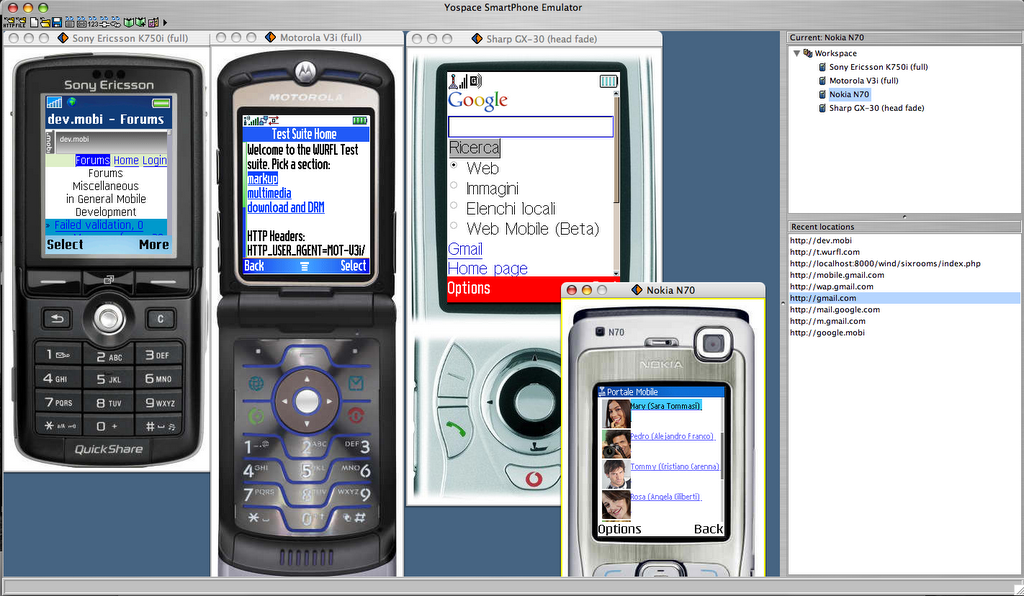
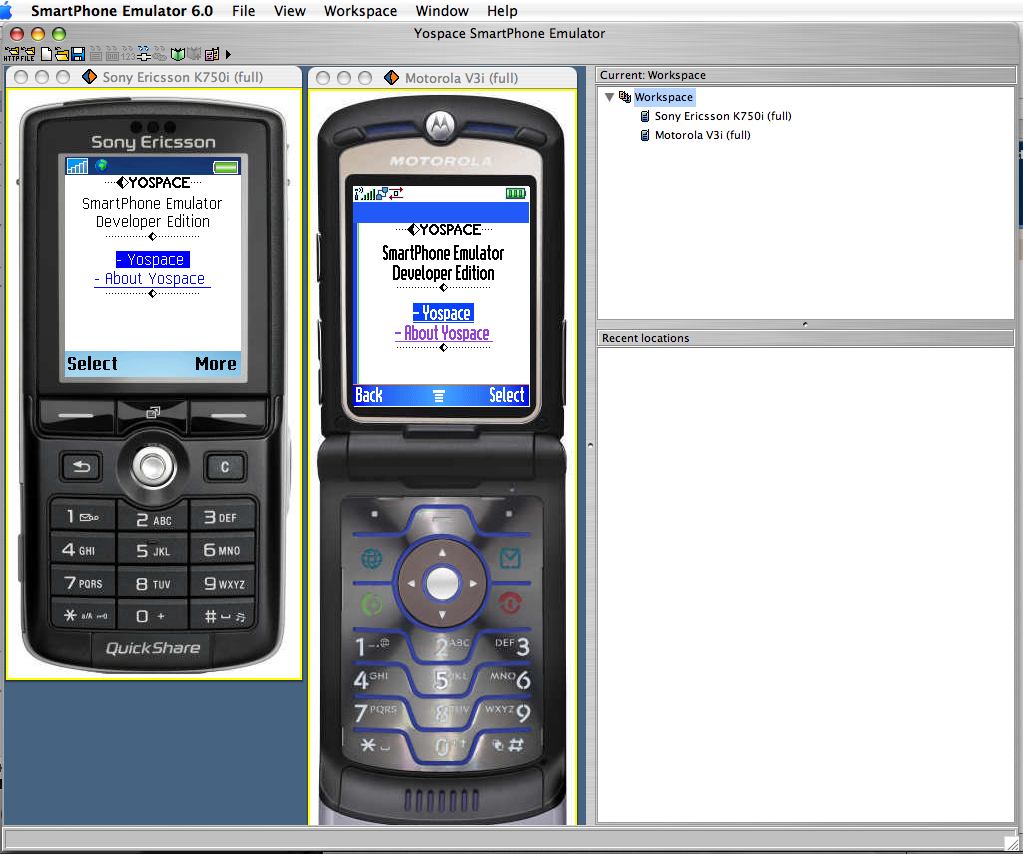
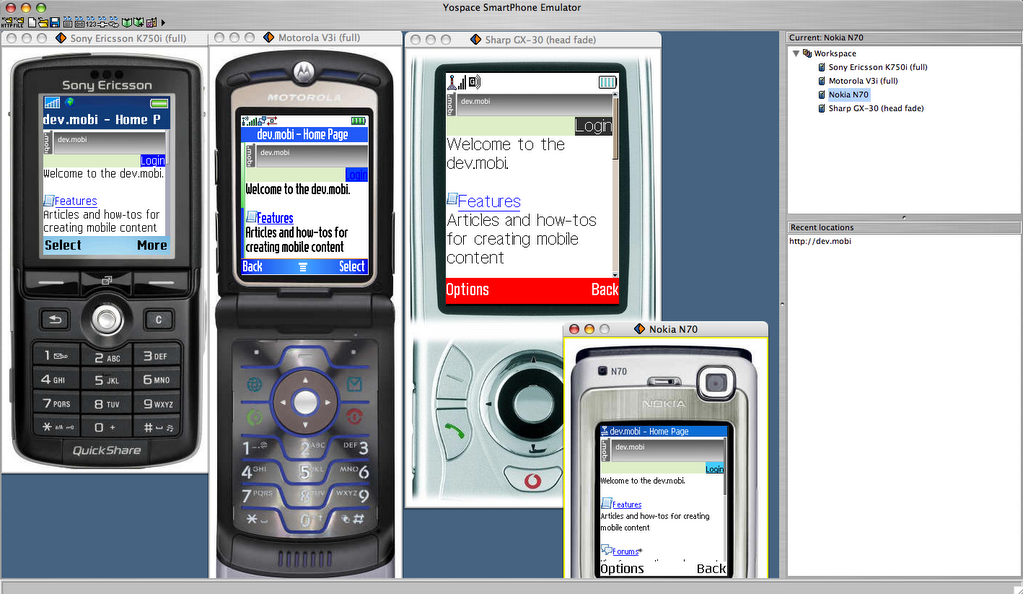
When you open it for the first time you get two devices side-by-side a Sony Ericsson K750i and a Motorola V3i. The devices will display a default start page from Yospace’s site.
On the right you will have a box that represents your workspace (the devices that you want to emulate) and another box for the recently visited locations. Very handy to jump back and forth.

Now the real fun starts. On the right you have a “workspace” box. Right-click and add all the devices that you like. I like to have different brands and families. I’ll add a couple of devices to show you how it works.

With 4 devices side-by-side it’s very easy to see how a page is rendered. You can load and re-load pages on a single device or on the entire workspace alltogether.

How are devices emulated? Yospace buys the real devices, checks the resolution, characters per line, number of lines, screen size in inches (they are from Middlesex in UK!) and everything that is needed to show how the devices look. They also test device features such as available fonts, font sizes, image formats, how images are rendered and so on. They do a deep device testing to make the emulation as real as possible.
Each device will act as the real device and you will be able to browse to any page. Here’s another screenshot with a different page on each emulated device. I could open single URL’s on each of them and then keep browsing. You can click on the buttons to see how it will be on the real device or use your keyboard (much easier!):

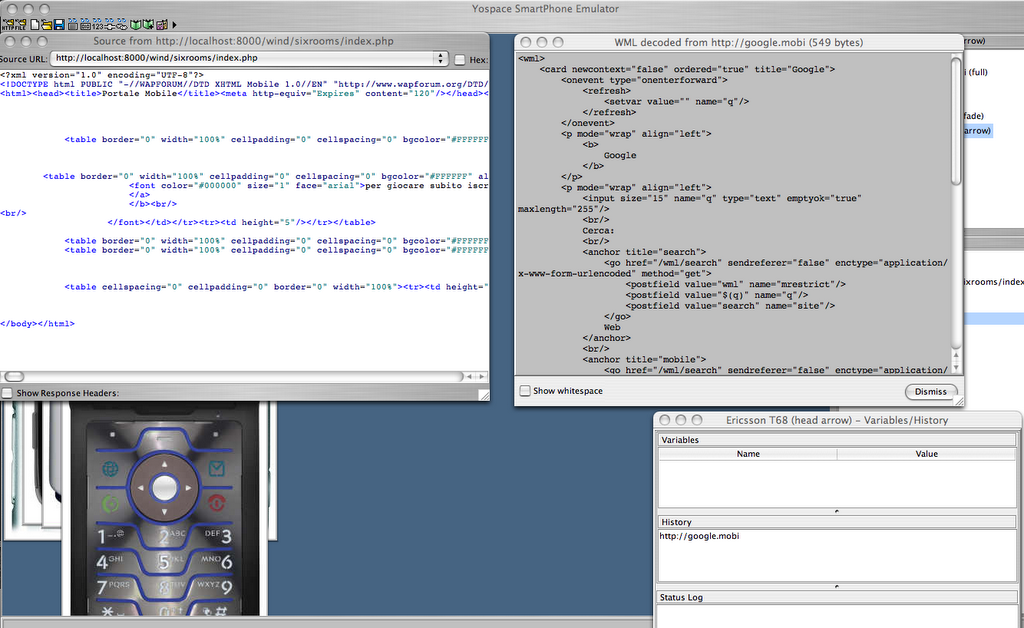
What else? Some of the tools available clearly come from the WML days, but they are very useful if you still want to support them and make sure you never get a “Unsupported content” or similar error.
Check out the full source, the decoded markup (if you received a WMLC page, otherwise it will be the same) and WML variables. Cookies are also available, but not in this screenshot. You can see, edit, add and remove them at your will. Feel the power!
Click on the screenshot to see it in fullscreen. You will notice that you can also see the HTTP headers, very useful if you want to check the charset, content-type and other headers. Hex view is also available, just in case you want to edit the binary version! πŸ˜‰
Source URL is a dropdown and you can pick previous pages still in cache (each device has its own cache!).

Like every good browser, SPEDE also give you the possibility to add and manage your bookmarks.


Something that is not present in your default browser, but that will be very useful if you’re a mobile developer is a “device settings” menu that you can personalize for each device.
Configure the user-agent string, decide the parsing strictness and add custom headers.

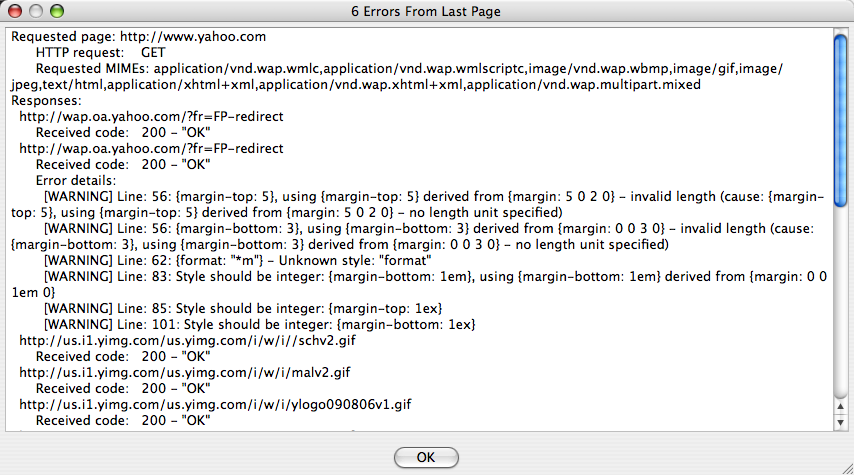
If you can choose between strict and relaxed validations… You will also want to know if your page effectively validates. SPEDE offers you this too, of course. See this last screenshot that shows errors (if any) and a list of the requests made to download the markup, CSS, images, etc. Very useful!

A “skin manager” will let you see all the available skins. As described previously, skins are not just images drawn around the page, but real implementation of the browser behaviour.

The last feature is also very important if you want to test your site from time to time to verify that everything is still working. The scripting engine. You will get two windows, one with an old Nokia 7110 and a text window. You can write your script, save it, re-open it and edit it. Once you’re happy with it, you can run it.
I have to admit I did not test it, but I understand how important it can be if you keep up a big site for a long time and always want to make sure it’s working properly.

Is this a perfect tool? Well, it’s a very good tool and if you’re serious about mobile development, I suggest it. Like every other software, it’s not perfect. While testing and taking screenshots, a couple of times the Sharp GX30 hung and did not want to open any other page. I forced the workspace to load another page and eventually worked. I don’t konw what happened.
The Motorola V3 and V3i did not load the images for a WAP page that I have developed and incidentally I have a V3 here and works like a charm. I know that YoSpace dedicated a lot of time to this tool and I believe that the rendering if faithful, but of course this little glitch raised some doubts or at least made wonder how precise can be the emulation of a third party tool. Will it be able to emulator all the different sides, behaviours and glitches? I think it’s a very tough job.
When you look at the source code, YoSpace kindly included syntax highlighting. My personal preference would have been for more intense colors such as red. Also, the “Status page” shows errors, if any, it would be great to also see it in the source code window, highlight the markup.

It would have been good to have more Siemens and LG devices.
When are new skins available for download?

One last thing is the general UI. I tested on a Mac OS X. The UI is clearly inspired by Windows. I know that it’s a big effort for a small number of users, but a more native interface would have been appreciated.

Nevertheless, this is a great tool and don’t forget that it’s DAMN cheap!

mobile web, make your own standards

Two days ago I posted about MS IEMobile and commented about the features they promote that are not based on any standard, but only on their own ideas and technologies.

Thanks to JΓ©rΓ΄me, I found a link on Six Apart that promotes an alternative way to advertize mobile versions of sites. Specifically of blogs (as that’s their very own business).

If you read the article down to the bottom of the page, you will discover that actually this “technology” was already agreed to become a standard!
So 5 guys get together, agree on something and HEY, that’s a standard!

I didn’t think it would be so easy to make a standard. I wonder what the W3C (I know they don’t make standards but recommendations, but what’s the difference?), IETF, ETSI and other organizations are here to do. πŸ™‚

Orange Partner site

While doing my normal research for new device descriptions resources I discovered this new developers’ site. New to me, at least.

Orange Partner sounds a lot like a site that will provide info only if you sign strict NDA’s or pay something to Orange. All this is not true! What a good news! πŸ˜€

Orange partner requires a registration, but it’s free and takes just a couple of minutes.
Once registered you can access a lot of valuable information about devices distributed by Orange all over Europe. The great thing is that it also lists devices that were customized for Orange. Descriptions are fairly well detailed and list most of the information that you will need about a device.

Lists of devices can be accessed in various ways, depending on the device type, country or Java platform. Not bad at all.

Here’s an example, the Motorola V3. Gives a fair description of the browser markups, messaging features, ringtones, etc. Also provides a sample user-agent and a UAProf URL.
Could go in more detail about J2ME features, but still it’s a lot of good information.

The site also features articles, an online FAQ and forums.

As you would expect from the site name (“partner”) there is a number of services to get your applications and services certified and be served on the Orange network.
Technical support request is also available.

The site is really well promising and already provides a lot of valuable information.

I am always surprised when I see a good site for mobile develoeprs, but maybe, eventually, big corporations have understood that the better support for third parties, the more services for their devices and customers (see my other posts about SonyEricsson, for example).

Tera-WURFL

More than 4 years ago I developed the first library to parse WURFL. Initially it was only a PHP file that parsed the XML and created an associative array.

Later I added a class to also search a device given a user-agent and get capability values for the user-agent. With the growth of WURFL, caching was needed to try to speed up the search and retrival of data.

My WURFL PHP library has a very minimal set of requirements, PHP and XML support compiled in. This is something that I never wanted to change during these years to make sure that ANYONE could download and use it.

I am happy to announce that more development has been done on top of my original library and that Steve Kamerman, the author, has achieved great performance results with his new library.
The new library uses MySQL, so a new requirement is added. For this reason I will keep my library as-is, but still, if you have a database available and want some good performances, then I suggest you take a look at Tera-WURFL.

It’s worth visiting the links presented below to see it in action.
There is a test page that lets you see how user-agents are matched and some speed test.
Also, since Tera-WURFL uses a database you will need to update it when a new XML comes. Steve provides a nice admin panel to manage the script and data (don’t mess up with it too much!).

So, once again, congratulations to Steve for his huge work and great new library.

Cingular allStar program

In August 2006 Cingular launched a new program for its develpers’ site called Cingular allStar.

I sent an email and quickly received a reply that they would be happy to list me as an allStar. I received a list of questions and you can now see the replies on the allStar program homepage.

Cingular is a very important operator in USA, we want to give better support to US devices and carriers in WURFL. This is certainly a first step towards that (not to mention all devices that we already list).

The developers site has changed a lot in the last year or so, demonstrating that the company wants to provide better support to developers. Many articles about browsing have popped on the site. This is a great for new developers approaching the mobile space.

Keep it up!

“flashlite_integration” mailing list

My friends from mobile|actionscript.it have launched a new mailing list dedicated to the flashlite integration in other environments such as J2ME and Symbian.

If you’re serious about flashlite you should definitely check flashlite_integration on Yahoo! Groups.

Group description from the homepage: “This group is dedicated to all the J2ME, Flash Lite and c++ developers that believe in the mobile market.
The group proposal is to give a support to the developers that are working in mobile project that runs above one of this technology or that integrate two or more of these.