Word verification

Even if my Blog is not so popular I decided to add the word verification on comments.
I really like to hear comments from my few readers, but I would like to make sure the comments are not about getting a mortgage or buying Viagra.

Sorry for the little hassle, but we need this.
I want everyone to be able to comment, but I also want to avoid this. If you are a real person and not a bot you won’t have much of a problem typing the words read from the image.

shopping mode: ON

Yesterday I went out and spent some money… I have been thinking about these gadgets for a few weeks now and yesterday was the right day.
I bought a new, sleek Mighty Mouse for my Mac. My old bulk-unnamed-notstyllish mouse didn’t fit with the Titanium portable and the Motorola V3. I would like to remind that that’s an OLD PB, bought when 1Ghz was the top. This is important because the new case is NOT as cool as the old one!
Anyway, back to the Mighty Mouse. It’s really cute, of course. Like probably most of the users, in the beginning I didn’t really know how to use the two buttons. I think most of the problem is the fact that you don’t see them. One you get used to it it’s just normal to do it. It takes about 10-20 minutes, not really a long time!
Using the wheel is totally natural. I thought it was a mini-joystick like IBM’s, but it’s really a little wheel that can go in any direction. I mostly use to go up and down, of course anyway being able to move it in any direction seems useful. Maybe some application will be able to use it, I think they should invest some time in this.
Before being able to personalize the buttons and the side-buttons, you need to install the software and restart (I HATE restarting). Once restarted I was also able to personalize the actions. Before installing the software the mouse acts JUST like a multibutton mouse, when you install the software, it becomes a monobutton mouse. You need to personalize it. Since I OFTEN use X11, I configured the wheel to act as the third button when clicked.
The use of the mouse is pretty much the same as any multibutton mouse which is cool to me. That is what people wanted. Plus, it adds the cool Apple-design.
Through the prefs you can configure anything, the behaviour of the buttons the speed of the double click and the speed of movement of the mouse itself and the wheel. Really all you need.
Clicking the middle button is strange, because you click the entire mouse, but it understands it’s the wheel and acts accordingly.

Really neat.

The other purchase was the PSP that has just landed in Europe.
I should probably talk about it for hours, but I won’t do it, I’m sure you already read many reviews on the net (if you mind about it). It’s pretty cool. It’s small, it’s not heavy AT ALL, the display is cool and all the keys are very good. I have purchased Wipeout Pure. Very nice.
I configured the wifi to connect to my home network, but I could not play in multiplayer because I didn’t find anyone (too early?). I can’t wait to try the multiplayer!

That’s it.

needful things

When you don’t know something you may be scared of it, or you might just WANT it.
I was reading Marcus’ blog (read the next post. Next? Yes, be patient) and I followed a link to Vodafone and then I saw a strange picture. following a few links and googling a little bit I discovered that I WANT this phone + the “bull accessory”.
It’s all Japanese so I can’t understand ANYTHING and I actually don’t know what it is and what it’s needed for, but I know that I just need it!

Take a look here.
If you go down around the middle of the page you will see an accessory (or at least I THINK it’s an accessory) called “bull”. I want it!

Finding information in mailing lists

Mailing lists are a great thing!
When I started to get on internet (we still did not browse it), I used to read on newsgroups. For some reason I have never had a good feeling with newsgroups, I always felt like it was hard to communicate and so as soon as I could I left them (as soon as I found other resources).
Mailing lists are my favourites (or favorites, as you like it better). I have to admit that from a user perspective the mailing list is not SO different from a newsgroup, you still use an e-mail client, your reply gets “propagated” to all the other subscribers and everyone can read and reply. Both newsgroups and mailing lists may or may not be moderated. Don’t ask me why, but I have always felt more comfortable with mailing lists.

Forums are a great thing. I have to say that the UI is MUCH better, contents are generally grouped by argument in sub-forums and all threads are grouped all together. When you find what you were looking for, you can follow the original thread and maybe reply (and quote). Modern forums (or bulletin boards) are very powerful.

On the other side, the mailing list arrives in your mailbox. Even if you can filter emails and maybe move them into specific mailboxes, you will always see a little number or something that reminds you that a mailing list you’re subscribed to is waiting for your replies. Considering my habits and my memory, this is of great help! I generally end up not reading forums or maybe visit them occasionally.

Now, what I DON’T LIKE about mailing lists?
This is actually not specific of mailing lists, I see it happen often in forums too, but anyway… I don’t like repeated questions.
If you have been on a mailing list for months or maybe years, you will notice that questions are often the same or similar. I personally don’t like to answer “STFW” or similar, I always try to give good pointers, but basic question are always repeated.
Unfortunately, as a new user on my mailing lists, I am sure I have asked those very basic, already seen, questions more than ones ( I feel so bad when someone answers “look at this message or thread” and I find the exact same question). So what I’m saying is not that I am pissed with people writing stupid questions, because I found myself in the same situation. I learnt to search in the archive, but sometimes it seems like I can’t find that specific question even if it was there.

I wonder there could be better search engines, but I alwso think that if they are not in place, yet, maybe they just could not find a way to make it work properly.
Sometimes I searched on Google’s newsgroups, but I never really found what I was looking for (and maybe my bad feeling about newsgroups did not let me search enough).

Did you ever try the search on Yahoo! groups? That is really bad. They should seriously work on that to make ti more usable. It’s 2005, we are approaching 2006, you can’t still have the “one word search” inherited from eGroups. How long ago did Yahoo! buy those mailing lists? And they never had a week or two to make it nicer?

Final words are that I don’t have an answer, but if you are working on anything to solve this (and I don’t mean writing a FAQ), please let me know and I’ll support you! 😀

Why I love to Shuffle

I recently started travelling more often (two days a week for about 3 hours).
Fortunately I don’t drive, but I use the train. This means I can read, watch a movie, look outside.
The first times I read the newspaper, then I brought a book, sometimes I watched a movie.
Being a Mac user I thought I needed an iPod, using all the battery of my PowerBook to use iTunes didn’t sound so smart.
I was about to buy a nice iPod shuffle, the 1GB, but then I read some rumors that a 2GB version was coming so I decided to wait a little bit.
Thanks to DADA, one of the companies I’m consulting for, I received a FREE 512MB iPod shuffle.
It is not exactly the model I wanted, but they gave it for free and this made me happy enough.

I plugged it into my notebook (unfortunately it’s a little bit too wide and I need to unplug my mouse while recharging), but it worked like a charm. I formatted it and loaded some random songs.
To my surprise and happiness I listened to a number of songs that I hadn’t played for quite a while! The battery lasts even too much (now that it’s new) and I could probably play all the songs at least 3 times! I have never drained all the enrgy out of the battery, I always wanted to load more songs before the battery ran out.
The update process is really simple and takes a few minutes. It loads about 110-120 songs which are more than enough for my full trip.
Now I don’t go out if I don’t have my shuffle.

Pros:

  • really easy to update and use
  • tiny and super-lightweight
  • plays a good number of songs

Cons:

  • none

I really can’t find a real con they only I can think of is that all my songs don’t fit in it, but I have to admit that the “shuffle feature” made me discover a good number of songs that I hadn’t played for a long time and this become a pro automatically!
Anotehr thing that someone might identify as a con is that it doesn’t have a display. In my opinion the display was not in the original idea of the player. IMHO the real idea behind the Shuffle is to upload a bunch of songs automatically and play them while walking, running, etc, so you don’t need a siplay like on the iPod where you have all your songs and playlists and go pick your single song or pick your favourite playlist.
For what I believe was the target of the iPod shuffle, it’s a complete success!

And now a nice “action shot” that sows how useful it can be at the seaside.

Back from holidays

I am (unfortunately) back from my short holidays. I am back online and got all my emails.

I will still not work full time and dedicate some time other things in my “real life” (do I still have one?), but I promise I will try to answer to emails quickly.
I am impressed by the amount of emails I received during this couple of weeks and WURFL, thank you all.

More updates in the next days.

BitTorrent performance

This is jsut a quick post to congratulate with myself for getting a new DSL provider.
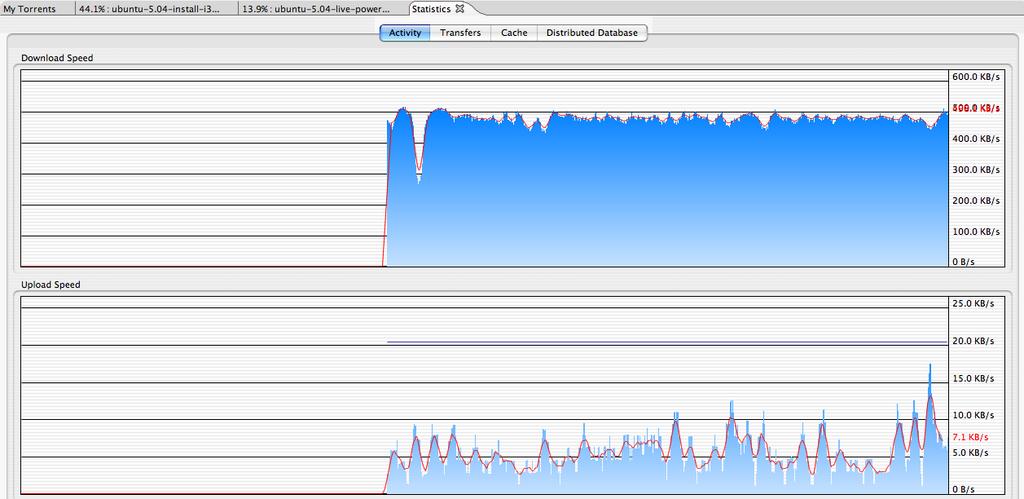
Forgetting about the *20* days that I had to wait for them to fix some problem in their servers (20 days are counted from the day they told me it should have worked, until it worked for real), I am now enjoying the pleasure of a 4Mbit download bandwidth.

Downloading Ubuntu was a good test, take a look at this screenshot:

As a non-pro-bittorrent-user I REALLY like Azureus. I don’t know if it’s the best, I don’t know if it’s the worst, I just like it (not only because it works on my mac). Did you see all the cool statistics? I can just staire at them for hours.
When I had a 2400baud modem I stood there, looking at my Zmodem (or Xmodem, depending on the BBS) looking at PKZip (200KB) downloading and uploading.

AH, I LOVE statistics.

Yahoo audio search

Thanks to a post on Julien’s blog (Italian only) I discovered the new “audio search” from Yahoo. Try it out, works nicely, too bad it directs you to payed downloads, but at least it’s legal! It nice that they provide the file format (WMA, for example) and the protection, such as if you can burn it on CD and pricing, of course.

Search page
About Audio Search

Does anybody remember ftpsearch.ntnu.no? The early days of file searching on the web.
Later it was acquired by Lycos, if I remember correctly, even if it was a project sponsored by the Norwegian University of Science and Technology. At that time you could also search for “pirated” MP3’s, obviously they closed it soon, but the original idea was really good. Today you can use File Mirrors, but you can still find pirated files, somehow…

Thumbs up to Yahoo for also listing other providers of music and not just their own songs.

Mobile Operators developers’ sites

I have been in the mobile biz for quite a few years now (they are going to be 6 years this fall!) and from the beginning finding information about devices has been a problem.
In the early days of WAP I could understand this, most people didn’t even know what they would have neeeded to know to develop a WAP site. Also, the first devices supporting WAP (in Europe, I’m not talking about HDML in USA) were not yet perfect and firmware releases fixed many little glitches. Having a hard time finding information about 2-3 devices was ok. It would have been better to have it, but still, it was ok, you’d just buy the device and test (and maybe upgrade the firmware when a major release would come).

Now we have tens of manufacturers from all around the world, tens of operators that often require modifications to the default features of a device.
There are thousands of developers around the world working for hundreds of small-medium-large companies and we still CAN NOT find information about certain devices.

Nokia, as we all know, offers the best documentation (for GSM devices).
DoCoMo is not even an issue, all devices are created equal (developer heaven: how do I get in?).
Motorola and SonyEricsson do something and deliver SOME information about their devices (did you ever read a spec doc from Motorola? it’s a little too short, IMHO, but at least I can get the screen size, colors, WAP version and a little more).
Siemens delivers periodically a “device matrix” with a lot of good information of 20-30 devices.

What is Samsung doing? Why is their site MSIE only? Why do they only provide information about j2me? Why is their forum so ugly? Didn’t they ever hear of phpBB or any other FREE forum software?

At least Samsung is doing something!
Alcatel hasn’t updated their developers’s site in a year or so.
Sagem doesn’t have a developers’ site (if you know the address let me know!).
LG doesn’t have a developers’ site.
Sanyo doesn’t have a developers’ site.
Panasonic doesn’t have a developers’ site.
Sendo doesn’t have a developers’ site.

Fortunately some operators thought that it was worth spending a little time testing the devices they were going to sell with their brand and luckily decided to share that VALUEABLE info with their partners and developers. Unfortunately many don’t update their sites!
I registered on t-mobile’s US developers’ site. Nice site, but did the employee leave the company? The last update is dated 2002!!
Cingular (+ AT&T, now) have a good site! +1 to cingular
TIM doesn’t have a developers’ site.
Telefonica has a developers’ site, but is it fair to make me pay to access it? Yes, it’s true that I make money selling contents to their customers, but it’s also true that Telefonica (just like all the other operators around the world) get a HIGH percentage of that money I ask to my customers. Isn’t that money enough? (ermm.. is money EVER enough??)

I am a little disappointed about the service they offer.
In my opinion it’s in THEIR interest (both manufacturers and operators) to share the device information with content and service providers. In my opinion Nokia is the only one who understood the value of this. EVERY new Nokia device that comes on the market is well documented and OF COURSE it will be supported by developers and users/customers will go buy another Nokia because they get plenty of contents well formatted and well designed. Do you know why? Because Nokia gave the tools to the developers!

PLEASE, prove me wrong, give me other good developers’ site! Let me know that LG or Panasonic, or someone else is offering a GOOD developers’ site.

DISCLAIMER: I did not name all the companies and ALL the developers site that I found. +1 to Openwave for their style guides and few device info. I’m sure they could do better, but still, they provide really good information about their browser, the device is not exactly their biz. Sprint developers’ site is good too. Nextel is ok, but a little outdated.

NOTICE: we are working on an updated, new, super-cool wireless FAQ, it would be cool to list all the good developers’ sites there, so let me know of developers’ sites! (in English, please)