Be innovative

Are you looking for something innovative?
Apple’s Mighty Mouse

It looks like Apple eventually decided to produce (and sell) a Mouse that is not limited to a single button. Exposé already made it clear that Apple understood that more than a button could be useful but it seemed like they did not want to abandon the original design. Well, it looks like they eventually made it to keep their design and allow users to have more than a button. Even better, we now have 4 (configurable). Button personalization is Mac-only, but it is supposed to be compatible with Windows 2000 and Windows XP. I’m sure it will soon also be Linux compatible.

I just hope, for windows users, that the drivers will be better than iPod’s Windows drivers.

Slightly OT, if I were a windows user and got an iPod I would NOT switch to Mac after testing the BAD support. Who would guarantee that OS X will work better?

Anyway, I’m off to buy a Mighty Mouse.

Is sourceforge keeping up with the site growth?

Sourceforge has fixed many of the problems they have had for a long time such as statistics. They still haven’t fixed the CVS+stat problem. It’s been there for about two years and we’re still waiting for them to fix it. Will it even be fixed? Will they move to SVN and drop CVS? Maybe this could be a solution!

Once again, while trying to upload a new release (WURFL 2.0, of course) I had problems with the FTP server. The upload failed, now there’s an empty file on the FTP and I can’t overwrite it. This has happened about 3 times in the last months. It is happening TOO often!
I have seen other developers complaining, they generally send you a reply in a couple of days saying:”do you still see the problem?” and of course the file has been removed and you may now upload a new file! Shall I simply rename the file and reupload it? Can’t they fix this?

When are they going to develop nicer forums? The homepage graphics has recently been updated, but the rest of the site is stuck at 3 years ago!
Sourceforge is a point of reference, every single developer on the internet knows it. I know it’s not simple AT ALL to keep alive such a huge site, but I think it could be better… There MUST be a “half-way” between the current status and perfection…

Just a little rant. Please, go on do your browsing…

IBM paying banners for outdated content?

I was reading my email on gmail and of course I get emails about mobile contents, development, WAP, etc.

I often look at the banners around the page, I’m always curious to see how well they are aimed and what are the keywords that make a banner appear. Sometimes I even click on them!

Today was a particularly lucky (or well aimed) day for Google and I clicked on 3 links related to the same email. One of these was about a software by IBM called WAPsody.

Here is the link:
http://www.zurich.ibm.com/csc/mobile/wapsody.html

But take a look at the contents. The screenshots on the right, the devices emulated. Was this page ever updated in the last 3-4 years? Still talking aobut the Nokia 7110 and Ericsson (NOT SonyEricsson) 380s? Still linking to the WAPForum homepage? Did anybody tell them that something has happened in the meantime?

I don’t mind if they don’t update their sites everyday, Alphaworks is a HUGE site and is almost impossible to keep it up to date and also, it’s good to have it as an archive and not search for an old article and read a “page not found” error. I wonder how good it is to pay for banners that link to an outdated software, or at least software description. Would you buy a software that was last updated in 2000?

Konfabulator for free!

So Apple added to Tiger widgets. Widgets are tiny applications that float on your screen when enabled (press F12 on your Mac).

While Apple declared it was an innovation, the guys at Konfabulator didn’t quite agree and were rather upset that Apple developed its own technology while it was SO similar to their.

I have used widgets since I have had Tiger (a couple of months now) and I have to say that I’m not particularly happy with it. Honestly I still don’t see that big use with them. I have the iTunes controller, forecasts, Calvin & Hobbes stip, calendar, calculator and a couple more. What I don’t like about widgets is that I need to start them and while they are on I can’t do anything on my desktop.
Why should I press F12, wait for widgets to start or get updated and then press the button to move to the next song on iTunes, when I can do it with two clicks on my Dock? Also why do widgets move between sessions? Every time I start them, I need to re-position them.

On the other side Konfabulator (it was free for testing) offers about the same functionality and the same cool graphics (or even better) and has had TONS of widgets available for at least a year (I didn’t know it before, I don’t know how long it’s been available, but I KNOW it’s quite popular).
Of course when Apple released their own widgets (Konfabulator used to call them widgets from the beginning) the guys from Pixoria thought it was time to move on, but also thought that Konfabulator was great, so they ported it for Windows XP. While I don’t have Windows XP I understand it’s popular from the number of widgets that were developed for windows!

Now Yahoo! has bought the software and hired the developers. What’s going on? What will happen? I consider Konfabulator superior mostly because I can have it floating of my desktop while doing other things. What do I need stickies for if they are hidden in a menu/desktop that I can see pressing F12? I will not see them on my desktop, then it’s as valuable as storing them in a todo list in iCal or in a text file… I don’t see the difference, really!

I am really curious to see what will Yahoo do. They promised to keep the development of the Mac version and possibly extend it to other platforms such as Tivo. We’ll see.
In the meantime I have downloaded the free version, YES, Yahoo! is giving it for free!
Why is Yahoo giving it for free?
They understood the power of the Apple widgets and want their hands on the Windows version?
They liked the idea of the Apple widgets but Konfabulator is better?
They simply wanted a new good looking tool?

just some pics

No real tech notes today. I am working on stuff not particularly innovative or complex, so I don’t have any real cool news or special things to post.

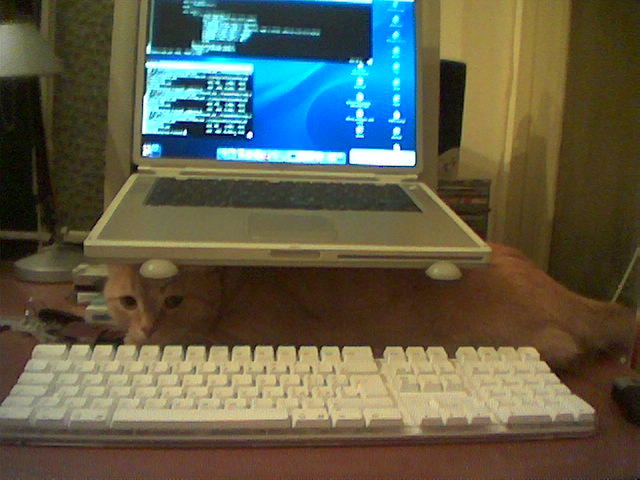
I will take this chance to post some pictures that will let everyone understand how hard it can be to work at home.

This is a picture of my cool Powerbook+external keyb+mouse+iCurve:

Cats like mice:

If you feel more serious, then you should read about what’s happening in London. Nothing to laugh about!

UAProf fun

A few minutes ago I needed to check some info about the V902 from Sharp, a VodafoneLive device. I opened the UAprof (http://www.sharp-mobile.com/UAProf/902SH_G001_base.xml) and started searching for the items I needed.

It looks like Sharp has made a new Audio codec: AMR nallow-band.
Apparently it is only supported for encoding. Decoding supports the more famous brother “AMR narrow band”.

I wonder how many companies and sites rely on this blindly…

An innovative keyboard?

Is this real of a hoax?

Take a look at this innovative keyboard. Every key is a tiny display (according to the FAQ an OLED display) so you can basically associate any icon and any event (a single keystroke or a combination) to any key on the keyboard.

Might be something interesting.

I wonder, is it worth? Will it offer a real extra value? Will I save time searching for commands in the menus and waste it searching for the appropriate key on my keyboard? Will I spend HOURS trying to optimize the key positions for games (do I play anything besides Puzzle Bobble and my pinball?) and softwares?

Maybe it could be useful for people that uses photoshop or similar, but in my case it would just be some geekness, most of the times I’m on the web, on a terminal or writing an email or a document thus I wouldn’t have that many keys to configure… But the colored icons with iTunes and eMulre are SO cool! 😀

SVG Tiny test

Thanks to Antoine who provided the files and to Darren that updated the Test suite we now have online tests for SVG Tiny support. If you would like to give it a try you can see the files here:
http://www.ukmedia.us/i/image_format.jsp

We already tested with the V800 and BOTH work properly so while we were told that the V800 supported only 1.1 it seems like it also supports 1.1 plus.

Submit your test results!

Edit: if you’re a computer and want to see it anyway you might want to give it a try with Opera 8 (latest subrelease), they already support it!

More Z107/Samsung Mobile Browser fun

Today I was testing some of my xHTML pages and noticed a nice new feature in the Z107.
I know this image sucks (out of focus) but still gives the idea. Take a look.

(I am really lazy, imagine to turn the image 90 degrees non-clockwise)

That is supposed to be a list of links but for some reason the Z107 moves the links a little bit to the right for each line. Why? I don’t know! How to avoid it? The page is an xHTML Basic, the list is contained in a div and has a little icon for each line, as you probably can see. If you remove the image the list is fixed.

Another thing that you can’t see in this screenshot is that if you have a link (an anchor) a “space” and a text, the Z107 will skip the space so the text of the link will be attached to the first word of the text after it (if you don’t have a br, of course!).

That’s all for now.